

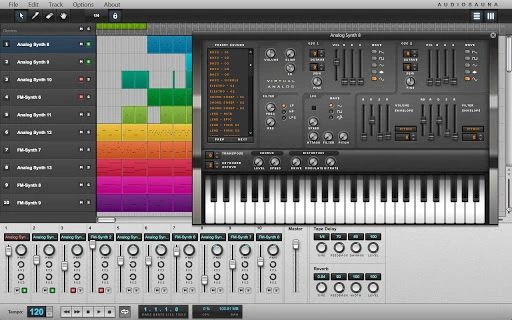
Description
Web-Based Audio Workstation with Advanced Synthesis
Overview
AudioSauna is a full-featured audio workstation designed for music creators who seek professional-grade synthesis and sampling capabilities directly within the browser. Built for real-time performance, it enables users to work with advanced polyphonic synthesizers, samplers, and live effects without the need for local installation. The software is particularly suited for composers, producers, and sound designers who require a lightweight yet powerful tool for music creation in a cloud-based environment. Its intuitive interface simplifies complex audio workflows, making it accessible to both beginners and experienced users.
AudioSauna addresses the common limitations of browser-based audio tools by delivering high-quality synthesis with minimal CPU usage, thanks to its optimized engine architecture. This allows for seamless performance even on modest hardware. The platform supports real-time playback and recording using a computer keyboard, enabling immediate musical experimentation. Users can save projects, export audio files, and build intricate compositions using pattern-based sequencing and piano roll editing. Whether used for live performance, studio production, or creative exploration, AudioSauna offers a compelling alternative to traditional desktop DAWs.
Key Features & Capabilities
- Two Virtual Analog Synthesizers – Each features two analog oscillators with multiple waveforms (SAW, SQUARE, TRIANGLE, SINE, NOISE), true FM modulation between oscillators, and comprehensive ADSR envelopes for both amplitude and filter cutoff. These synthesizers support LP and HP filters, LFOs with three waveforms, and built-in effects like distortion, chorus, and bitrate control.
- Frequency Modulation Synthesizer – Based on Yamaha’s DX-21, this synthesizer includes four sine wave operators, eight FM algorithms, and full envelope and LFO control. It supports unlimited polyphony, portamento, transpose, and over 60 presets, offering deep sound design potential.
- Advanced Stereo Sampler – Allows import of WAV and MP3 files with support for layering, key range mapping, auto-mapping, ping-pong looping, reverse playback, and precise sample editing. Users can adjust start/end points, loop parameters, pan, transpose, and finetune with professional-grade controls.
- Integrated Sequencer & Mixer – Features pattern arrangement and piano roll modes for composing melodies and rhythms. The mixer includes level, pan, mute, solo, AUX1, and AUX2 controls, along with built-in delay and reverb effects. Snap-to-grid functionality enhances timing precision.
- Project Management & Export – Users can save and load songs, record performances directly from the keyboard, and export final compositions as audio files, enabling full workflow completion within the browser.
User Interface, Workflow & Performance
AudioSauna’s user interface is designed for clarity and efficiency, with a clean layout that organizes synthesizers, sampler, sequencer, and mixer into easily navigable sections. Navigation is intuitive, relying on tabbed panels and visual feedback to guide users through complex operations. The workflow supports real-time interaction, allowing immediate sound shaping and performance adjustments. Keyboard playback and recording are seamlessly integrated, making it easy to experiment with melodies and rhythms on the fly.
Performance is optimized for web environments, with the developer emphasizing minimal CPU usage through a unique engine architecture. While specific resource consumption data was not provided, the design suggests stable operation even during intensive sessions. The software maintains responsiveness across multiple tracks and effects, and no stability issues were reported in the available information. The lack of local installation reduces setup time and ensures consistent performance across devices.
Compatibility & System Requirements
AudioSauna is compatible with Windows, Mac, and Linux operating systems, making it accessible to a broad range of users across different platforms. The software is delivered as a web application, meaning it runs directly in the browser without requiring a dedicated installer. The installation size is listed at 50 MB, which reflects the core application package. However, exact system requirements such as RAM, CPU, or browser version were not specified by the developer.
Users should ensure their browser supports modern Web Audio API standards to access full functionality. Compatibility with older browsers or low-end devices may vary, but the lightweight nature of the application suggests it can operate on a wide range of hardware. The developer did not provide additional system requirements, so users are advised to test the software in their environment for optimal results.
Pros and Cons
Pros
- Full-featured audio workstation accessible via browser
- Two high-quality synthesizers with professional-grade controls
- Advanced sampler with layering, looping, and key mapping
- Real-time keyboard recording and pattern-based sequencing
- Minimal CPU usage for a web-based audio tool
- Free to use with no licensing restrictions
- Project saving and audio export capabilities
Cons
- Exact system requirements not publicly listed
- Performance details not specified beyond general optimization claims
- Dependent on browser compatibility and internet connection
- Limited offline functionality compared to desktop DAWs
- May require a modern browser for full feature access
FAQ Section
Is AudioSauna available for free?
Yes, AudioSauna is completely free to use with no hidden costs or subscription requirements.
What operating systems does AudioSauna support?
AudioSauna is compatible with Windows, Mac, and Linux, as it operates as a web application within modern browsers.
Can I use AudioSauna offline?
While the software is designed to run in the browser, full functionality may require an active internet connection. Offline usage is not guaranteed and depends on browser caching and local storage capabilities.
What file formats can I import into the sampler?
The sampler supports WAV and MP3 audio files for import, allowing users to integrate their own samples into compositions.
How do I update AudioSauna?
As a web-based application, updates are automatically applied by the developer. Users do not need to manually download or install new versions.
Final Thoughts
AudioSauna stands out as a powerful, browser-based audio workstation that delivers professional-grade synthesis and sampling tools without the overhead of traditional desktop software. Its dual synthesizer architecture, advanced sampler, and integrated sequencer provide a comprehensive environment for music creation, all accessible from any device with a modern browser. The emphasis on low CPU usage and real-time performance makes it ideal for users seeking a lightweight yet capable solution for music production.
While it lacks some features typical of full desktop DAWs—such as extensive plugin support and offline mode—it compensates with seamless cross-platform access and zero installation time. The free pricing model further enhances its appeal. For composers, producers, and sound designers who value flexibility and immediate access, AudioSauna offers a compelling alternative to conventional software.
Download AudioSauna now to begin creating high-quality music in the browser with advanced synthesis and sampling tools.
Guides & Tutorials for AudioSauna App for Chrome
How to install AudioSauna App for Chrome
- Click the Preview / Download button above.
- Once redirected, accept the terms and click Install.
- Wait for the AudioSauna App for Chrome download to finish on your device.
How to use AudioSauna App for Chrome
This software is primarily used for its core features described above. Open the app after installation to explore its capabilities.
User Reviews for AudioSauna App for Chrome 0
No reviews found





